GPT-5.6 Luna Missing from Codex Subagents? Workarounds

If GPT-5.6 Luna is missing from the Codex subagent list, check which models your client offers and how you are starting the agent. A model setting does not override a restricted candidate list. A separate task with Luna as its main model is another route, but it is not a child subagent.
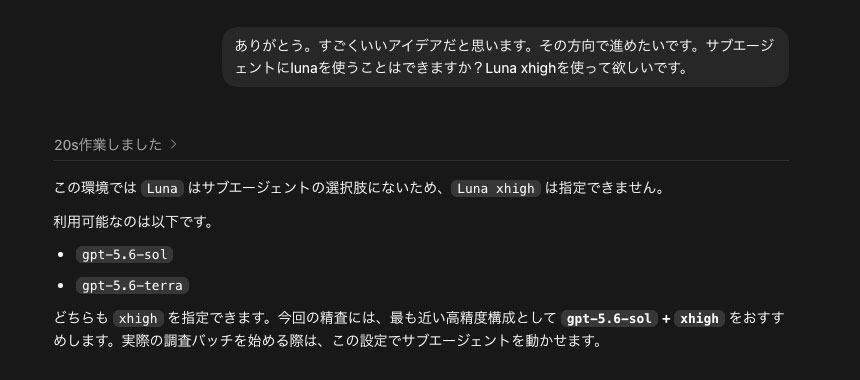
I ran into this when trying to launch Luna from a project started with GPT-5.6 SOL. This article describes that experience, custom-agent settings, and the separate-task workaround.
The experience and configuration examples below reflect information current as of August 1, 2026. Available models and reasoning levels vary by client, account, and workspace; this is not a claim that Luna is missing from every current Codex environment.
Conclusion: Luna was not impossible; I was using the wrong entry point
Even in a project started with GPT-5.6 SOL, there are ways to use Luna as a separate agent. In my environment, however, the multi-agent v2 subagent candidates were limited to SOL and Terra, so Luna could not be selected directly from that list.
This summary was prompted by the answer I received from Codex and a post describing how to launch a Luna thread. I am using the post as a reference, while combining it with the behavior I confirmed in my own environment.
There are two separate questions here:
- Can the parent and child use different models?
- Does the current Codex client or account expose Luna as an available subagent model?
The fact that the parent is SOL does not automatically prohibit Luna. The candidate list and the ability to create a separate thread are different entry points.
The “thread” approach used in this article
The workaround discussed here is not to launch Luna as a subagent, but to open a separate thread with Luna as its main model. In this article, a task means one goal started from a new chat, while a thread means the conversation history used to pursue that goal.
A subagent is an AI delegated part of the parent task. Luna launched as a separate thread is not a child of the parent. Instead, it is a separate task working in the same project, with the necessary background, target files, and completion criteria passed to it.
I explain the difference between tasks, threads, and subagents in a separate article: Codex terms explained: task, thread, and subagent from the perspective of a new chat.
The referenced post also describes setting a goal for the Luna thread and checking its progress from the sidebar. It is a different workflow from delegation to a subagent, but it is practical when you need to choose the model explicitly.
Method 1: Define Luna as a custom agent
If you want detailed model settings in a local Codex client, create a custom agent in the project root. This example sets the reasoning effort to max.
.codex/agents/luna-max.tomlname = "luna_max"
description = "Fast subagent for clearly defined, repetitive, or high-volume work."
model = "gpt-5.6-luna"
model_reasoning_effort = "max"
developer_instructions = """
Work only within the scope delegated by the parent agent.
Return a concise summary with the reasoning and referenced files.
Do not expand the work into the parent agent's scope without permission.
"""The official Subagents documentation explains that a custom agent can override the parent model and reasoning settings. After creating the file, restart Codex or start a new task so it is loaded again.
Method 2: Start a separate Luna thread
If Luna does not appear among the subagent candidates, start a new thread with Luna as the main model. This is not a SOL child agent. It is a separate task that works with the same project folder.
Start a new thread with GPT-5.6 Luna and Max reasoning.
Work only on the following files in this project and complete the requested investigation.
Set a clear goal for the work and, when finished, summarize the result, reasoning, and referenced files.
Leave concise progress updates so the main thread can review the work.
This approach passes only the necessary background instead of duplicating the entire parent history. If the goal is to use Luna reliably, it can be clearer than forcing a subagent path that does not list Luna.
Be careful when inheriting the full history
Another reason I got stuck was the launch method that copied the parent task history as-is. In that environment, a subagent that inherited the full history also inherited the parent model and reasoning effort, so it could not switch from SOL to Luna.
This may not be identical in every Codex client. The official documentation describes custom agents as able to override the parent model, while a specific multi-agent v2 surface may expose a smaller candidate list. When Luna does not appear, first distinguish “the model is unavailable” from “this launch path cannot use the model.”
Method 3: Set Luna as the default subagent model
If you want unspecified subagents in a project to default to Luna with Max reasoning, add this to .codex/config.toml:
[agents]
enabled = true
default_subagent_model = "gpt-5.6-luna"
default_subagent_reasoning_effort = "max"
This changes the default only. It does not override a client-side candidate restriction or make Luna available where the account cannot use it.
What to check if it still does not work
- Whether the current Codex client exposes Luna as a subagent candidate
- Whether a workspace or administrator policy disables Luna
- Whether the account or API key can use Luna
- Whether max is supported for Luna in that environment
If max is rejected while the model itself is available, try lowering the effort to xhigh, then to high if needed. Model availability and reasoning-effort availability are separate checks.
Start with a read-only experiment
Do not delegate a large write-heavy change immediately after setting up Luna max. Start with research, file listings, or log summaries that are easy to undo.
Confirm the actual model, reasoning effort, and whether the work ran as a thread or a subagent. Only then expand to changes that write files. More agents and threads also increase token use and waiting time, so using Luna should not become the goal by itself.
Summary
There are ways to use Luna in a project started with GPT-5.6 SOL. But when multi-agent v2 exposes only SOL and Terra as subagent candidates, Luna cannot be selected directly from that route.
Try a custom agent, reload it in a new task, or start Luna as a separate thread. The thread approach is especially practical because it lets you choose Luna as the main model and review progress from the sidebar, even though it is not a child subagent.
This article is based on my failed attempt to use GPT-5.6 Luna as a subagent, the answer I received from Codex, and the referenced X post. Model availability, reasoning levels, and administrator policies vary by environment, so the configuration examples may not work unchanged everywhere.